Quickstart
JACK Background
The jack crate provides Rust bindings to the JACK
API. Typically, a JACK server is started and clients connect to it to gain
access to audio and midi inputs and outputs, along with synchronization
mechanisms and APIs.
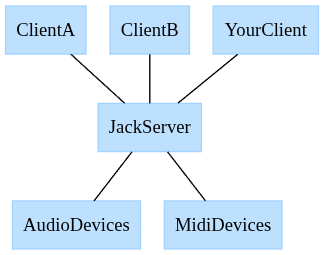
The JACK server is responsible for:
- Discovering and exposing audio and midi devices.
- Synchronizing audio and midi data.
- Managing the processing graph.
JACK clients are responsible for:
- Registering themselves with JACK.
- Registering callbacks to provide audio/midi data to the JACK server.
JACk Server
There are two Linux implementations tested with the jack crate.
- JACK2 - The primary implementation of JACK. Can use realtime scheduling and
alsa under the hood to provide the best latency. The JACK2 server may be
started through the
jackdCLI orqjackctlGUI. - Pipewire - The most commonly used audio & video stream server for Linux. May
not provide the best latency, but is very convenient to use. Pipewire itself
has its own API, but it also exposes a JACK server.
pw-jackis often used to patch in Pipewire’s JACK implementation. For example, you can run your Rust JACK app with:pw-jack cargo run.
JACK Clients
This is where the jack crate comes in. Once a JACK server is running on the
system, you can run your client to produce audio. Here is a simple jack
program that can take inputs and forward them to outputs.
fn main() {
    // 1. Create client
    let (client, _status) =
        jack::Client::new("rust_jack_simple", jack::ClientOptions::default()).unwrap();

    // 2. Register ports. They will be used in a callback that will be
    // called when new data is available.
    let in_a: jack::Port<jack::AudioIn> = client
        .register_port("rust_in_l", jack::AudioIn::default())
        .unwrap();
    let in_b: jack::Port<jack::AudioIn> = client
        .register_port("rust_in_r", jack::AudioIn::default())
        .unwrap();
    let mut out_a: jack::Port<jack::AudioOut> = client
        .register_port("rust_out_l", jack::AudioOut::default())
        .unwrap();
    let mut out_b: jack::Port<jack::AudioOut> = client
        .register_port("rust_out_r", jack::AudioOut::default())
        .unwrap();
    let process_callback = move |_: &jack::Client, ps: &jack::ProcessScope| -> jack::Control {
        let out_a_p = out_a.as_mut_slice(ps);
        let out_b_p = out_b.as_mut_slice(ps);
        let in_a_p = in_a.as_slice(ps);
        let in_b_p = in_b.as_slice(ps);
        out_a_p.clone_from_slice(in_a_p);
        out_b_p.clone_from_slice(in_b_p);
        jack::Control::Continue
    };
    let process = jack::contrib::ClosureProcessHandler::new(process_callback);

    // 3. Activate the client, which starts the processing.
    let active_client = client.activate_async((), process).unwrap();

    // 4. Wait for user input to quit
    println!("Press enter/return to quit...");
    let mut user_input = String::new();
    io::stdin().read_line(&mut user_input).ok();

    // 5. Not needed as the async client will cease processing on `drop`.
    if let Err(err) = active_client.deactivate() {
        eprintln!("JACK exited with error: {err}");
    }
}
Connecting Ports
- Run the JACK client using the Pipewire JACK server.
pw-jack cargo run - View the JACK processing graph. This can be done by using the
qjackctlGUI and clicking Graphs.pw-jack qjackctl - Connect the ports as you see fit! In the below, a webcam microphone is
connected to the speakers. Warning, do not try this at home! Connecting a
microphone input to a speaker output may produce a terrible echo.

Features
The Rust features for the jack crate are defined in
https://github.com/RustAudio/rust-jack/blob/main/Cargo.toml. To see the
documentation for Rust features in general, see the Rust
Book.
Disabling Default Features
The jack crate ships with a reasonable set of default features. To enable just
a subset of features, set default-features to false and select only the
desired features.
jack = { version = "..", default-features = false, features = ["log"] }
log
Default: Yes
If the log crate should be used to handle JACK
logging. Requires setting up a logging implementation to make messages
available.
dynamic_loading
Default: Yes
Load libjack at runtime as opposed to the standard dynamic linking. This is
preferred as it allows pw-jack to intercept the loading at runtime to provide
the Pipewire JACK server implementation.
controller
Default: No
Enables the jack::contrib::controller module which provides utilities for
building controllable JACK processors with lock-free communication. See the
Controller documentation for usage details.
Logging
JACK can communicate info and error messages. By default, the log
crate is hooked up to output
messages. However, other logging methods can be used with the
set_logger function.
No Logging
Logging from jack can be disabled entirely by setting the logger to None.
#![allow(unused)]
fn main() {
jack::set_logger(jack::LoggerType::None);
}
Log Crate (default)
The log crate is the default logger if the log feature is enabled, which is
enabled by default. The log crate provides a facade for logging; it provides
macros to perform logging, but another mechanism or crate is required to
actually perform the logging.
In the example below, we use the env_logger
crate to display logging for info and
error severity level messages.
#![allow(unused)]
fn main() {
env_logger::builder().filter(None, log::LevelFilter::Info).init();

// JACK may log things to `info!` or `error!`.
let (client, _status) =
      jack::Client::new("rust_jack_simple", jack::ClientOptions::default()).unwrap();
}
Stdio
If the log feature is not enabled, then jack will log info messages to
stdout and error messages to stderr. These usually show up in the terminal.
#![allow(unused)]
fn main() {
jack::set_logger(jack::LoggerType::Stdio);
}
Custom
jack::LoggerType::Custom can be used to set a custom logger. Here is
stdout/stderr implemented as a custom logger:
fn main() {
    jack::set_logger(jack::LoggerType::Custom{info: stdout_handler, error: stderr_handler});
    ...
}

unsafe extern "C" fn stdout_handler(msg: *const libc::c_char) {
    let res = std::panic::catch_unwind(|| match std::ffi::CStr::from_ptr(msg).to_str() {
        Ok(msg) => println!("{}", msg),
        Err(err) => println!("failed to log to JACK info: {:?}", err),
    });
    if let Err(err) = res {
        eprintln!("{err:?}");
        std::mem::forget(err); // Prevent from rethrowing panic.
    }
}

unsafe extern "C" fn stderr_handler(msg: *const libc::c_char) {
    let res = std::panic::catch_unwind(|| match std::ffi::CStr::from_ptr(msg).to_str() {
        Ok(msg) => eprintln!("{}", msg),
        Err(err) => eprintln!("failed to log to JACK error: {:?}", err),
    });
    if let Err(err) = res {
        eprintln!("{err:?}");
        std::mem::forget(err); // Prevent from rethrowing panic.
    }
}
Contrib
jack::contrib contains convenient but optional utilities.
Closure Callbacks
Closure callbacks allow you to define functionality inline.
Process Closure
Audio and midi processing can be defined through closures. This involves:
- Creating a closure that captures the appropriate state (including JACK ports) and
- Activating it within a client.
#![allow(unused)]
fn main() {
// 1. Create the client.
let (client, _status) =
    jack::Client::new("silence", jack::ClientOptions::default()).unwrap();

// 2. Define the state.
let mut output = client.register_port("out", jack::AudioOut::default());
let silence_value = 0.0;

// 3. Define the closure. Use `move` to capture the required state.
let process_callback = move |_: &jack::Client, ps: &jack::ProcessScope| -> jack::Control {
    output.as_mut_slice(ps).fill(silence_value);
    jack::Control::Continue
};

// 4. Start processing.
let process = jack::contrib::ClosureProcessHandler::new(process_callback);
let active_client = client.activate_async((), process).unwrap();
}
State + Process Closure + Buffer Closure
jack::contrib::ClosureProcessHandler also allows defining a buffer size
callback that can share state with the process callback. The buffer size
callback is useful as it allows the handler to adapt to any changes in the
buffer size.
#![allow(unused)]
fn main() {
// 1. Create the client.
let (client, _status) =
    jack::Client::new("silence", jack::ClientOptions::default()).unwrap();

// 2. Define the state.
struct State {
    silence: Vec<f32>,
    output: jack::Port<jack::AudioOut>,
}
let state = State {
    silence: Vec::new(),
    output: client
        .register_port("out", jack::AudioOut::default())
        .unwrap(),
};

// 3. Define the state and closure.
let process_callback = |state: &mut State, _: &jack::Client, ps: &jack::ProcessScope| {
    state
        .output
        .as_mut_slice(ps)
        .copy_from_slice(state.silence.as_slice());
    jack::Control::Continue
};
let buffer_callback = |state: &mut State, _: &jack::Client, len: jack::Frames| {
    state.silence = vec![0f32; len as usize];
    jack::Control::Continue
};

// 4. Start processing.
let process =
    jack::contrib::ClosureProcessHandler::with_state(state, process_callback, buffer_callback);
let active_client = client.activate_async((), process).unwrap();
}
Controller
Note: This module requires the controller feature, which is not enabled by default.
Add jack = { version = "...", features = ["controller"] } to your Cargo.toml.
The controller module provides utilities for building controllable JACK processors with lock-free communication. This is useful when you need to send commands to or receive notifications from your audio processor without blocking the real-time thread.
Overview
The controller pattern separates your audio processing into two parts:
- Processor - Runs in the real-time audio thread and handles audio/midi processing
- Controller - Runs outside the real-time thread and can send commands or receive notifications
Communication between them uses lock-free ring buffers, making it safe for real-time audio.
Basic Usage
Implement the ControlledProcessorTrait to create a controllable processor:
#![allow(unused)]
fn main() {
use jack::contrib::controller::{
    ControlledProcessorTrait, ProcessorChannels, ProcessorHandle,
};

// Define your command and notification types
enum Command {
    SetVolume(f32),
    Mute,
    Unmute,
}

enum Notification {
    ClippingDetected,
    VolumeChanged(f32),
}

// Define your processor state
struct VolumeProcessor {
    output: jack::Port<jack::AudioOut>,
    input: jack::Port<jack::AudioIn>,
    volume: f32,
    muted: bool,
}

impl ControlledProcessorTrait for VolumeProcessor {
    type Command = Command;
    type Notification = Notification;

    fn buffer_size(
        &mut self,
        _client: &jack::Client,
        _size: jack::Frames,
        _channels: &mut ProcessorChannels<Self::Command, Self::Notification>,
    ) -> jack::Control {
        jack::Control::Continue
    }

    fn process(
        &mut self,
        _client: &jack::Client,
        scope: &jack::ProcessScope,
        channels: &mut ProcessorChannels<Self::Command, Self::Notification>,
    ) -> jack::Control {
        // Handle incoming commands
        while let Some(cmd) = channels.recv_command() {
            match cmd {
                Command::SetVolume(v) => {
                    self.volume = v;
                    let _ = channels.try_notify(Notification::VolumeChanged(v));
                }
                Command::Mute => self.muted = true,
                Command::Unmute => self.muted = false,
            }
        }

        // Process audio
        let input = self.input.as_slice(scope);
        let output = self.output.as_mut_slice(scope);
        let gain = if self.muted { 0.0 } else { self.volume };

        for (out, inp) in output.iter_mut().zip(input.iter()) {
            *out = inp * gain;
        }

        jack::Control::Continue
    }
}
}
Creating and Using the Processor
Use the instance method to create both the processor and its control handle:
#![allow(unused)]
fn main() {
let (client, _status) =
    jack::Client::new("controlled", jack::ClientOptions::default()).unwrap();

let input = client.register_port("in", jack::AudioIn::default()).unwrap();
let output = client.register_port("out", jack::AudioOut::default()).unwrap();

let processor = VolumeProcessor {
    input,
    output,
    volume: 1.0,
    muted: false,
};

// Create the processor instance and control handle
// Arguments: notification channel size, command channel size
let (processor_instance, mut handle) = processor.instance(16, 16);

// Activate the client with the processor
let active_client = client.activate_async((), processor_instance).unwrap();

// Now you can control the processor from any thread
handle.send_command(Command::SetVolume(0.5)).unwrap();

// And receive notifications
for notification in handle.drain_notifications() {
    match notification {
        Notification::ClippingDetected => println!("Clipping detected!"),
        Notification::VolumeChanged(v) => println!("Volume changed to {}", v),
    }
}
}
Channel Capacities
When calling instance, you specify the capacity of both ring buffers:
notification_channel_size- How many notifications can be queued from processor to controllercommand_channel_size- How many commands can be queued from controller to processor
Choose sizes based on your expected message rates. If a channel is full, push will fail,
so handle this appropriately in your code.
Transport Sync
If your processor needs to respond to JACK transport changes, implement the sync method
and optionally set SLOW_SYNC:
#![allow(unused)]
fn main() {
impl ControlledProcessorTrait for MyProcessor {
    // ...

    const SLOW_SYNC: bool = true; // Set if sync may take multiple cycles

    fn sync(
        &mut self,
        _client: &jack::Client,
        state: jack::TransportState,
        pos: &jack::TransportPosition,
        channels: &mut ProcessorChannels<Self::Command, Self::Notification>,
    ) -> bool {
        // Handle transport state changes
        // Return true when ready to play
        true
    }
}
}